
20 Best AI Tools in 2027
Best AI Tools
Table of Contents
Choosing the right AI tool has become surprisingly difficult. There are now AI assistants, writing platforms, image generators, video editors, research tools, SEO platforms, automation apps and productivity systems for almost every task. The problem is not finding an AI tool. It is finding the right one for your specific workflow without wasting money on features you will never use.
This guide compares 20 of the best AI tools in 2026 for creators, freelancers, marketers, entrepreneurs and businesses. Instead of simply listing popular software, we look at what each tool is designed to do, who should use it, its strengths and limitations, pricing considerations, and the situations where an alternative may make more sense.
You will find tools for content creation, writing, research, video, image generation, SEO, productivity, presentations, automation and digital products.
Whether you are starting with AI or already have a collection of AI software, the goal is simple: help you build a smaller, more useful toolkit that actually improves your work.
Editorial note: Pricing and features can change quickly. Always confirm the current plan, limits and regional availability on the provider’s official website before purchasing.
Quick Comparison — Best AI Tools at a Glance
| Tool | Best For | Category | Free Option | Starting Price* |
| ChatGPT | General AI work | AI Assistant | Yes | Check current plan |
| Claude | Writing & analysis | AI Assistant | Yes | $20/mo monthly |
| Gemini | Google users & research | AI Assistant | Yes | Check current plan |
| Perplexity | AI-powered research | Research | Yes | Check current plan |
| Canva | Design & content | Design | Yes | Pro from $180/year in current US pricing |
| Adobe Firefly | Generative creative work | Image/Video | Limited/free options | $9.99/mo |
| Midjourney | AI images | Image Generation | No free plan listed | $10/mo |
| Runway | AI video | Video | Yes | Check current plan |
| Descript | Video/podcast editing | Video | Yes | $16/mo |
| ElevenLabs | AI voice & audio | Audio | Yes | $6/mo |
| Synthesia | Business videos | Video | Yes | Check current plan |
| Gamma | Presentations & documents | Productivity | Yes | Check current plan |
| Notion | Workspace & knowledge | Productivity | Yes | $10/member/mo |
| Zapier | Workflow automation | Automation | Yes | $19.99/mo |
| Make | Visual automation | Automation | Yes | $12/mo |
| Semrush | SEO & AI visibility | SEO | Trial available | Check current plan |
| Surfer | Content optimization | SEO | Trial available | Check current plan |
| Jasper | Marketing content | Marketing | 7-day trial | $69/mo monthly |
| Grammarly | Editing & writing | Writing | Yes | $12/mo shown for Pro |
| Gamma | AI presentations | Presentations | Yes | Check current plan |
*Pricing can vary by billing cycle, region, taxes, promotions and plan. The table uses publicly available pricing where it could be verified. Check the provider before purchase.
Note: Gamma appears once as a dedicated recommendation below; the table can be adjusted to replace the duplicate row with another tool if you want exactly 20 unique table entries.
The 20 Best AI Tools in 2026
1. ChatGPT—Best for General-Purpose AI Work
What It Does
ChatGPT is a general-purpose AI assistant that can help with writing, brainstorming, research, data analysis, coding, document work, image generation, and many other tasks.
Its biggest advantage is versatility. Instead of buying a separate AI application for every small task, many users can use one assistant as the starting point for their workflow.
For creators, that can mean developing article outlines, rewriting drafts, generating content ideas, or analyzing uploaded files. Businesses can use it for internal documents, brainstorming, research, and repetitive knowledge work.

Best For
- Content creators
- Bloggers
- Freelancers
- Entrepreneurs
- Researchers
- Small businesses
- General productivity
Key Features
- Conversational AI assistance
- File analysis
- Data analysis
- Image generation
- Web-based research capabilities
- Custom AI workflows and assistants
Pros
- Extremely versatile
- Useful across many different tasks
- Beginner-friendly
- Strong ecosystem of capabilities
Cons
- Usage limits vary by plan
- Output still needs human review
- Not necessarily the best specialized tool for every task
Pricing
A free plan is available. Paid plans provide expanded access and additional capabilities. OpenAI’s current pricing page should be checked before publication or purchase because models and limits change.
Our Verdict
ChatGPT is one of the strongest starting points for people who want a single AI assistant capable of handling many different types of work. It makes the most sense when you need flexibility rather than one highly specialized function.
Its main limitation is also its greatest strength: because it does so many things, specialists may still prefer dedicated tools for SEO, video production, design or automation.
Best Alternative
Claude may be preferable when your workflow is heavily focused on long-form writing, document analysis and careful reasoning.
2. Claude—Best for Writing, Analysis, and Long Documents
What It Does
Claude is Anthropic’s AI assistant designed for conversational work, writing, analysis, coding, and research-oriented tasks.
It can be especially useful when the quality of reasoning and writing matters more than simply generating a quick answer.
Best For
- Writers
- Researchers
- Developers
- Business professionals
- People working with long documents
Key Features
- Writing and editing
- Document analysis
- Data visualization
- Web search
- Research
- Claude Code
- Projects and connected tools on paid plans
Pros
- Strong writing workflow
- Useful for document-heavy work
- Free plan available
- Research and productivity features
Cons
- Usage limits apply
- Advanced access requires a paid plan
- Feature availability can change
Pricing
Claude currently offers a free plan. Pro is listed at $20/month when billed monthly or $17/month equivalent with annual billing. Higher-use Max and business options are also available.
Our Verdict
Claude is worth considering if your work involves substantial writing, analysis, or document processing. It is less useful to think of it as a replacement for every other application and more useful as a high-quality thinking and writing partner.
Best Alternative
ChatGPT is the more natural alternative if you want a broader range of AI features in one ecosystem.
3. Gemini — Best for Google-Centered Workflows
What It Does
Gemini is Google’s AI ecosystem, with capabilities connected to Google’s broader productivity environment.
For users who already spend their working day in Gmail, Docs, Sheets, Drive, and other Google services, that integration can be more valuable than simply comparing chatbot responses.
Best For
- Google Workspace users
- Researchers
- Students and professionals
- Content creators
- Businesses using Google services
Key Features
- AI assistance
- Research features
- Google app integration
- Image and video generation capabilities through supported plans
- Notebook and productivity features
- AI development tools
Pros
- Strong Google ecosystem integration
- Useful for research and productivity
- Multiple AI capabilities under Google AI plans
- Good option for existing Google users
Cons
- Features differ by plan and country
- Some advanced capabilities require paid access
- Google frequently changes AI products and naming
Pricing
Google currently offers multiple Google AI plans, including Plus, Pro, and Ultra. Pricing and availability vary by market, so check Google’s current plan page before publishing exact local pricing.
Our Verdict
Gemini makes the most sense when AI is being added to an existing Google-centered workflow. If your work already happens in Google products, the integration can be more important than small differences between AI models.
Best Alternative
ChatGPT is a strong alternative for users who want a more platform-independent AI assistant.
4. Perplexity—Best for AI-Powered Research
What It Does
Perplexity combines AI-generated answers with web search and citations. Instead of treating an AI assistant as a closed knowledge base, it is designed around finding and synthesizing information.
This makes it particularly useful for research-heavy workflows.
Best For
- Researchers
- Bloggers
- Journalists
- Marketers
- Students
- Business analysts
Key Features
- Web search
- Cited answers
- Pro Search
- Research features
- File analysis
- Image and video generation on supported plans
- Multiple AI models on paid plans
Pros
- Research-focused workflow
- Citations make source checking easier
- Free plan available
- Useful for current information
Cons
- AI summaries still need source verification
- Advanced usage requires paid access
- Search quality depends on the sources discovered
Pricing
Perplexity currently offers a Free Standard plan, Pro, Max, and enterprise options. Its Help Center confirms a free plan and advanced Pro capabilities; current Pro pricing should be checked directly before publication because plans evolve.
Our Verdict
Perplexity is one of the most useful choices when your main question is not simply “write this for me” but “help me research this topic and show me where the information came from.”
Best Alternative
Gemini or ChatGPT with web research may be preferable if research is only one part of a much larger workflow.
5. Canva — Best for Easy AI-Assisted Design
What It Does
Canva combines graphic design tools with AI features. It is aimed at people who need professional-looking visual content without becoming advanced graphic designers.
It can support social posts, presentations, thumbnails, marketing materials, documents, and many other formats.
Best For
- Social media creators
- Bloggers
- Small businesses
- YouTubers
- Digital-product sellers
- Non-designers
Key Features
- Drag-and-drop editor
- Templates
- AI design features
- Background removal
- AI resizing and translation
- Brand tools
- Large media library
Pros
- Very beginner-friendly
- Huge range of templates
- Useful for many content formats
- Free plan available
Cons
- Some advanced AI features are restricted by plan
- Template-based designs can look generic
- Professional designers may prefer more specialized software
Pricing
Canva currently lists a free plan and pro. Its US pricing page currently shows Pro at $180/year for one person, with monthly pricing and regional differences possible.
Our Verdict
Canva is one of the most practical AI tools for creators because it combines AI with a familiar visual editor. It is particularly useful when speed matters more than building every design from scratch.
Best Alternative
Adobe Firefly is a better fit when generative creative work and Adobe’s ecosystem are more important.
6. Adobe Firefly — Best for Generative Creative Work
What It Does
Adobe Firefly is Adobe’s generative AI platform for creating and editing visual and creative assets.
It is especially relevant for designers, marketers, and businesses already using Adobe products.
Best For
- Designers
- Marketers
- Content creators
- Creative agencies
- Adobe users
Key Features
- AI image generation
- Image editing
- Generative creative workflows
- Video and audio generation capabilities
- Integration with Adobe’s creative ecosystem
Pros
- Strong creative ecosystem
- Useful for professional workflows
- Multiple media types
- Familiar Adobe environment for existing users
Cons
- Credit/usage systems can be confusing
- Advanced usage can become expensive
- Best value may depend on existing Adobe subscriptions
Pricing
Adobe currently lists Firefly Standard at $9.99/month and Firefly Pro at $19.99/month, with higher tiers also available.
Our Verdict
Firefly is a strong option for creators who want generative AI inside a professional creative ecosystem rather than relying on a standalone image generator.
Best Alternative
Midjourney is a strong alternative for users primarily focused on AI-generated artwork and visual exploration.
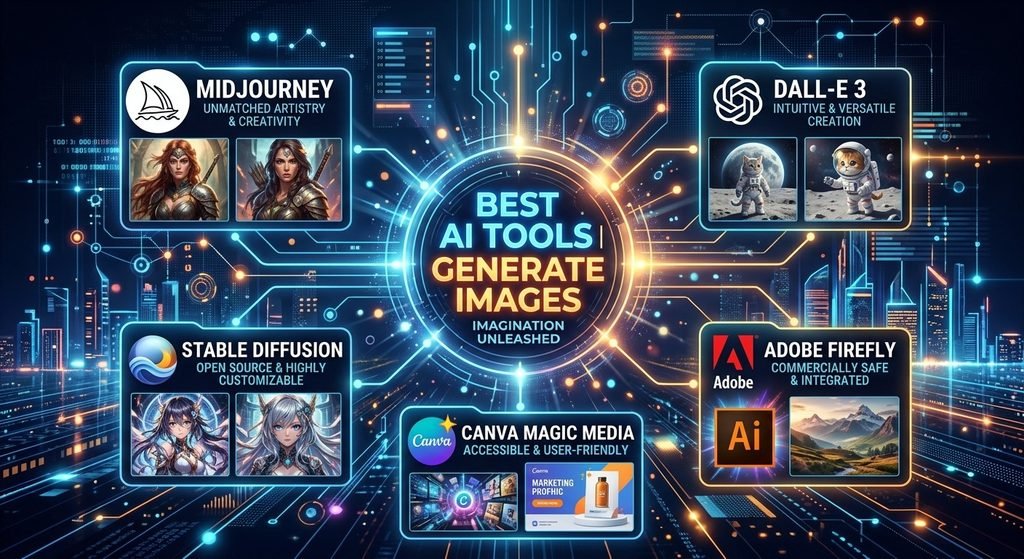
7. Midjourney—Best for AI Image Generation
What It Does
Midjourney focuses heavily on AI-generated images and visual experimentation.
It is particularly attractive to creators who want distinctive artwork, concept visuals, illustrations and creative imagery.
Best For
- Digital artists
- POD designers
- Creative marketers
- Concept artists
- Social media creators
Key Features
- AI image generation
- Image variations
- Style exploration
- Web-based and Discord workflows
- Video generation on supported plans
- Stealth Mode on Pro and Mega
Pros
- Strong creative image generation
- Multiple subscription levels
- Commercial usage terms for subscribers
- Powerful exploration workflow
Cons
- No traditional free tier listed
- Subscription required
- Less suitable than Canva for conventional business design
Pricing
Midjourney currently lists Basic at $10/month, Standard at $30, Pro at $60 and Mega at $120. Annual plans receive a discount.
Our Verdict
Midjourney is particularly interesting for creators who need original visual concepts rather than standard business graphics. It can be excellent for creative exploration, but users should understand the subscription and usage model before committing.
Best Alternative
Adobe Firefly is preferable when integration with Adobe tools and broader creative workflows matter more.
8. Runway—Best for AI Video Creation
What It Does
Runway focuses on AI-assisted video generation and creative video workflows.
It is designed for creators who want to experiment with generating or transforming video rather than relying entirely on traditional editing.
Best For
- Video creators
- Filmmakers
- Advertisers
- Social media creators
- Creative teams
Key Features
- AI video generation
- Generative editing
- Creative video tools
- Image-to-video workflows
- Video transformation
Pros
- Strong focus on AI video
- Useful for creative experimentation
- Suitable for short-form content
- More specialized than general AI assistants
Cons
- Generative video can consume credits quickly
- Results require review and iteration
- Pricing and model access change frequently
Pricing
Runway offers a free option and paid plans. Because its credits, models, and limits change regularly, verify the current pricing page before publishing exact figures.
Our Verdict
Runway is worth considering when video generation itself is the goal. It should not necessarily replace a conventional editor for every project, but it can become a powerful part of an AI-assisted production workflow.
Best Alternative
Descript is better when the priority is editing existing video, podcasts, and recordings.
9. Descript—Best for Video and Podcast Editing
What It Does
Descript approaches video editing through text. You can work with transcriptions and use AI-assisted tools for editing, audio cleanup, clips, and other production tasks.
Best For
- YouTubers
- Podcasters
- Course creators
- Interview creators
- Small video teams
Key Features
- Text-based video editing
- Automatic transcription
- AI video editing
- AI voice tools
- Captions
- Studio Sound
- Clip creation
Pros
- Beginner-friendly editing approach
- Strong podcast workflow
- Useful AI editing tools
- Free plan available
Cons
- Usage limits apply
- Advanced features require paid plans
- Traditional editors may prefer timeline-based software
Pricing
Descript currently offers a free plan. Its Hobbyist plan is listed at $16/month with annual billing shown at a discounted equivalent, while Creator and Business plans provide higher limits and features.
Our Verdict
Descript is especially useful when your content begins as spoken words: podcasts, interviews, tutorials, webinars, and YouTube videos. Its text-first approach can remove much of the friction from editing.
Best Alternative
Runway is more appropriate when your main goal is generating new AI video.
10. ElevenLabs—Best for AI Voice and Audio
What It Does
ElevenLabs provides AI voice, speech, and audio-generation technology.
For creators, it can be used for voiceovers, narration, dubbing, and other audio production workflows.
Best For
- YouTube creators
- Podcasters
- Video creators
- Developers
- Businesses producing narrated content
Key Features
- Text-to-speech
- Speech-to-text
- Voice design
- Voice cloning
- Dubbing
- Music
- Sound effects
Pros
- Strong audio-focused platform
- Free plan available
- Commercial options on paid plans
- Useful for multilingual workflows
Cons
- Credit-based usage can become expensive
- Voice cloning requires responsible use
- Advanced production needs may require higher plans
Pricing
ElevenLabs currently lists Free at $0, Starter at $6/month, Creator at $22/month and Pro at $99/month, with business tiers above those.
Our Verdict
ElevenLabs is one of the more specialized AI tools on this list. If voice is a core part of your content workflow, it can be much more useful than trying to force a general AI assistant to handle every audio task.
Best Alternative
Descript is a better choice if voice generation is only one part of a larger video-editing workflow.
11. Synthesia — Best for Business Videos
What It Does
Synthesia is designed around AI-generated business videos using avatars and AI voices.
It is particularly useful when organizations need training, onboarding, internal communication, or educational videos without traditional filming.
Best For
- Businesses
- Training teams
- Course creators
- HR departments
- Corporate communication
Key Features
- AI avatars
- AI voices
- Video creation
- Business templates
- Enterprise collaboration
- Localization features
Pros
- Designed specifically for business video
- Useful for training content
- Reduces the need for traditional filming
- Enterprise-oriented features
Cons
- Less suitable for cinematic creative video
- Avatar-based content may not fit every brand
- Advanced business features can require higher plans
Pricing
Synthesia currently offers a free Basic plan for exploring its editor and testing avatars and voices. Starter and creator plans are available for regular production, while enterprise pricing is customized.
Our Verdict
Synthesia is a practical choice when the objective is communication rather than entertainment. Training and instructional teams can benefit particularly from repeatable avatar-based production.
Best Alternative
Runway is more suitable for creative AI-generated video.
12. Gamma — Best for AI Presentations and Documents
What It Does
Gamma turns prompts, outlines, and existing content into presentations, documents, websites, and other visual assets.
It is particularly useful when the challenge is transforming information into something structured and presentable.
Best For
- Entrepreneurs
- Students
- Marketers
- Consultants
- Sales teams
- Presenters
Key Features
- AI presentations
- AI documents
- AI websites
- Templates and themes
- AI editing
- Export to common formats
- API access on supported plans
Pros
- Fast presentation creation
- Useful document workflow
- Beginner-friendly
- Free tier available
Cons
- AI-generated layouts still need review
- Design control is less granular than specialist software
- Paid features vary by plan
Pricing
Gamma offers a free plan and paid Plus, Pro, and higher tiers. Exact pricing should be checked on Gamma’s current pricing page.
Our Verdict
Gamma is valuable when you regularly need presentations, proposals, reports, or simple web pages but do not want to start from a blank canvas.
Best Alternative
Canva is better if you need broader graphic design capabilities.
13. Notion—Best for AI-Assisted Productivity
What It Does
Notion combines documents, databases, project management and knowledge management. Its AI features extend that workspace with AI-assisted writing, search, meeting notes and agent-style workflows.
Best For
- Small teams
- Entrepreneurs
- Project managers
- Content teams
- Freelancers
Key Features
- Documents
- Databases
- Project management
- AI writing
- AI meeting notes
- Search
- Connected workspaces
Pros
- Flexible workspace
- Strong organization capabilities
- Useful for team knowledge
- Free plan available
Cons
- Flexibility can create complexity
- AI access differs by plan
- Takes time to build a good workspace
Pricing
Notion currently lists Free at $0, Plus at $10/member/month, and Business at $20/member/month. Notion states that AI is included with Business and Enterprise, while other plans have trial AI capabilities.
Our Verdict
Notion is most valuable when AI needs to work alongside your information rather than sitting in a separate chatbot window. It is particularly useful for managing projects, documentation, and recurring processes.
Best Alternative
Gamma is better for turning information into polished visual documents and presentations.
14. Zapier — Best for AI Workflow Automation
What It Does
Zapier connects applications and automates repetitive tasks. Its newer AI capabilities make it possible to add AI steps to workflows.
For example, a workflow can receive a form submission, analyze the information with AI and then update another application.
Best For
- Small businesses
- Marketers
- Operations teams
- Entrepreneurs
- No-code automation users
Key Features
- Workflow automation
- AI actions
- Forms
- Tables
- App integrations
- Multi-step workflows
- AI orchestration
Pros
- Large app ecosystem
- Beginner-friendly automation
- Powerful no-code workflow builder
- Free plan available
Cons
- Costs increase with usage
- Complex workflows can become difficult to manage
- Task-based pricing requires monitoring
Pricing
Zapier currently lists a free plan with 100 tasks/month. Professional starts at $19.99/month, with Team starting at $69/month.
Our Verdict
Zapier is useful when the goal is not merely generating content but connecting AI to the rest of the business. It becomes especially valuable after you identify repetitive tasks that happen every week.
Best Alternative
Make can be preferable for users who want more visual control over complex automation scenarios.
15. Make—Best for Visual Automation
What It Does
Make is a visual automation platform that lets users connect applications, data and AI-powered processes into workflows.
Best For
- Automation builders
- Small businesses
- Agencies
- AI workflow creators
- Operations teams
Key Features
- Visual workflow builder
- 3,000+ app connections
- Routers and filters
- AI applications
- API access
- Scenario automation
Pros
- Visual workflow design
- Flexible automation
- Free plan available
- Strong option for AI workflows
Cons
- More complex than basic automation tools
- Credit-based usage needs monitoring
- Advanced workflows have a learning curve
Pricing
Make current lists free at $0 with 1,000 credits/month. Core starts at $12/month for 10,000 credits, while Pro starts at $21/month.
Our Verdict
Make is a strong choice for users who want to build sophisticated AI workflows without immediately moving into traditional software development.
Best Alternative
Zapier is generally easier for beginners who prioritize simplicity.
16. Semrush—Best for SEO and AI Search Visibility
What It Does
Semrush is a broad digital marketing and SEO platform with tools for keyword research, site auditing, competitive analysis, and increasingly AI-search visibility.
Best For
- SEO professionals
- Bloggers
- Agencies
- Businesses
- Content marketers
Key Features
- Keyword research
- Position tracking
- Site auditing
- Competitor research
- AI visibility tracking
- Content optimization
- AI search monitoring
Pros
- Very broad SEO toolkit
- Useful for serious SEO campaigns
- AI search visibility features
- Strong competitive research capabilities
Cons
- Expensive for beginners
- A large feature set can be overwhelming
- Best value comes from regular use
Pricing
Semrush pricing varies by toolkit and billing cycle. Its current SEO + AI Search pricing page lists plans beginning around $117/month on annual billing for its SEO tier, while standalone AI Visibility pricing begins at $99/month per domain on annual billing.
Our Verdict
Semrush is more appropriate for people treating SEO as a serious business activity than for someone publishing a few articles casually. Its biggest advantage is the breadth of information available in one platform.
Best Alternative
Surfer is a more focused option for content optimization.
17. Surfer—Best for AI-Assisted Content Optimization
What It Does
Surfer focuses on SEO content optimization, keyword research, content auditing and AI-assisted content workflows.
Best For
- Bloggers
- SEO writers
- Content teams
- Agencies
- Website owners
Key Features
- Content optimization
- Keyword research
- Content audits
- AI-assisted article creation
- AI visibility features
- Google Docs and WordPress integrations on supported plans
Pros
- Content-focused SEO workflow
- Useful optimization guidance
- Strong fit for bloggers
- Trial available
Cons
- Can be expensive for casual users
- SEO recommendations should not replace editorial judgment
- Usage limits vary by plan
Pricing
Surfer’s pricing changes across billing options. Current official pricing shows paid plans including Essential and Scale, while its documentation confirms a 7-day trial for new accounts.
Our Verdict
Surfer is especially useful when you already know what you want to publish and need a structured way to optimize it for search. It works best as a decision-support tool, not as a substitute for original expertise.
Best Alternative
Semrush is preferable if you need broader SEO and competitive research.
18. Jasper—Best for Marketing Teams
What It Does
Jasper is designed specifically around marketing content and brand consistency.
Unlike general AI assistants, its positioning focuses heavily on marketing workflows, brand voice and repeatable content production.
Best For
- Marketing teams
- Agencies
- Businesses
- Content strategists
- Brand teams
Key Features
- Marketing content creation
- Brand voice
- Knowledge assets
- Marketing agents
- Content workflows
- Custom AI agents on business plans
Pros
- Marketing-focused
- Strong brand customization
- Useful for teams
- Structured marketing workflows
Cons
- More expensive than general AI assistants
- May be unnecessary for individual users
- Advanced usage can involve additional credits
Pricing
Jasper currently lists Pro at $69/month when billed monthly or $59/month billed annually. Business pricing is customized, and the company offers a 7-day free trial.
Our Verdict
Jasper makes more sense when content creation is part of an organized marketing operation. For a solo user who simply wants help writing emails or blog drafts, a general AI assistant may provide better value.
Best Alternative
ChatGPT is a flexible alternative for individuals and smaller budgets.

19. Grammarly — Best for Editing and Writing Quality
What It Does
Grammarly combines grammar checking, rewriting, tone adjustment, and AI-assisted writing features.
Its value is not necessarily generating an entire piece of content. It can be more useful as an editing layer after the first draft exists.
Best For
- Writers
- Students
- Freelancers
- Businesses
- Email-heavy professionals
Key Features
- Grammar and spelling assistance
- Rewriting
- Tone adjustment
- AI prompts
- Plagiarism detection on supported plans
- AI-generated text detection features
Pros
- Easy to use
- Works across many writing environments
- Useful for editing
- Free plan available
Cons
- Advanced features require Pro
- Not a complete content-production platform
- AI suggestions still require judgment
Pricing
Grammarly currently lists Free at $0 and Pro at $12/month on its plans page, with billing options and regional pricing potentially differing.
Our Verdict
Grammarly is best viewed as an editing and communication assistant rather than a replacement for a full writing workflow. It can be especially useful for polishing important emails, articles, and business communications.
Best Alternative
Claude is better if you need deeper rewriting, analysis, and long-form content development.
20. Gamma—Best for Fast Visual Communication
What It Does
Gamma deserves attention for a second reason beyond presentation generation: it can turn the same core information into multiple formats, including presentations, documents, websites and social content.
For entrepreneurs, this makes it useful for repurposing one idea across different communication formats.
Best For
- Entrepreneurs
- Consultants
- Digital-product creators
- Sales teams
- Content marketers
Key Features
- AI presentations
- AI documents
- Websites
- Social content
- Visual graphics
- Export options
- API capabilities
Pros
- Strong repurposing workflow
- Fast visual creation
- Free tier
- Useful for business communication
Cons
- Less control than specialized design tools
- AI layouts need editing
- Paid features vary by plan
Pricing
Gamma offers free, Plus, Pro, and higher business-oriented plans. Confirm the current price before publication because plan pricing can change.
Our Verdict
Gamma is particularly useful when you want to move from an idea to a polished business asset quickly. It is not a universal replacement for PowerPoint, Canva, or a full website builder, but it can dramatically reduce the blank-page problem.
Best Alternative
Canva is a stronger all-purpose design platform.
How We Selected These AI Tools
Jaafer Pro’s goal is not to create a list based purely on popularity.
The selection focuses on whether a tool solves a real problem for creators, freelancers, entrepreneurs, and businesses.
The main criteria are
- Usefulness—Does the product solve a meaningful problem?
- Output quality—Is the result useful enough to become part of a real workflow?
- Ease of use—Can a beginner understand the product without excessive setup?
- Features—Does it provide meaningful capabilities rather than one novelty feature?
- Pricing and value—Is the cost reasonable for the intended user?
- Reliability—Is the product established enough to be considered for regular workflows?
- Integrations—Can it connect with other software where appropriate?
- Use cases—Does it serve a specific audience particularly well?
- Accessibility—Is there a practical way for new users to try it?
- Long-term value—Could it become part of a repeatable workflow?
This is an editorial comparison, not a claim that Jaafer Pro personally tested every product. Before publication, adding original screenshots, real workflow tests, and examples would make the article substantially stronger.
How to Choose the Right AI Tool
1. Start With the Problem You Need to Solve
Don’t start by asking, “Which AI tool is most popular?”
Start with:
What am I trying to accomplish?
For example:
- Write blog articles → writing/SEO tools
- Create thumbnails → Canva or image tools
- Produce videos → Runway, Descript, or Synthesia
- Research topics → Perplexity
- Automate repetitive tasks → Zapier or Make
- Organize projects → Notion
- Create presentations → Gamma
- Improve SEO → Semrush or Surfer
The task should determine the software.
2. Compare Features
More features do not automatically mean better value.
A freelancer may need only writing, research, and file analysis. Paying for an enterprise marketing platform would be unnecessary.
Compare the features you will actually use.
3. Check Pricing and Usage Limits
Look beyond the headline price.
Check:
- AI credits
- Word limits
- Video minutes
- Image generations
- Number of projects
- Team seats
- Export restrictions
- API usage
- Commercial rights
A cheap plan can become expensive if you regularly exceed its limits.
4. Test the Free Version When Available
If there is a free plan or trial, use it before committing.
Give the tool a real task from your workflow rather than testing it with a random example.
For example, a blogger could use their actual article brief. A YouTuber could upload a real transcript.
5. Check Integrations
An AI tool becomes much more valuable when it fits your existing software.
For example:
Website → form → AI → spreadsheet → email
is more powerful than an AI tool that simply generates text in isolation.
6. Consider Privacy and Data Handling
Before uploading sensitive information, check:
- Whether data is used for model training
- Retention policies
- Enterprise controls
- Encryption
- Data deletion options
- Third-party subprocessors
Do not upload confidential business information simply because an AI tool accepts file uploads.
7. Think About Long-Term Value
The best AI software is not necessarily the one with the most impressive demo.
The better question is
Will I still use this tool every week six months from now?
If the answer is yes, a paid subscription may make sense.
Best AI Tools by Use Case
Best AI Tools for Content Creation
A practical content stack could combine:
- ChatGPT—ideas, outlines, and drafts
- Claude—editing and long-form refinement
- Canva — graphics and social assets
- Grammarly — final editing
- Surfer—SEO optimization
For a new creator, starting with two or three tools is usually better than subscribing to ten.
Internal-link opportunity: Best AI Tools for Content Creators in 2026
Best AI Tools for Video
Consider:
- Runway for generative video
- Descript for editing and podcasts
- Synthesia for business and training videos
- ElevenLabs for voice production
A strong workflow could be:
Script → voice → video → editing → captions → publishing
Best AI Tools for Image Generation
For visual creators:
- Midjourney—creative image generation
- Adobe Firefly—generative creative workflows
- Canva—design and publishing
The right choice depends on whether you need original artwork, professional creative integration, or fast marketing graphics.
Best AI Tools for Writing
For writing, consider:
- ChatGPT
- Claude
- Grammarly
- Jasper
General AI assistants are usually better for ideation and drafting, while Grammarly is particularly useful as a polishing layer.
Best AI Tools for SEO
For serious SEO:
- Semrush—broad SEO research and AI visibility
- Surfer—content optimization
If your priority is keyword research, competitors, and technical SEO, look toward Semrush. If your priority is optimizing individual articles, Surfer can be a more focused option.
Internal-link opportunity: Best AI Tools for SEO in 2026
Best AI Tools for Small Businesses
A small business might benefit most from:
- ChatGPT
- Canva
- Notion
- Zapier
- Make
- Grammarly
The goal should be reducing repetitive work rather than adding more subscriptions.
Best AI Tools for Productivity
For productivity:
- ChatGPT for general assistance
- Notion for organization
- Perplexity for research
- Gamma for presentations
- Zapier/Make for automation
Best AI Tools for Digital Products
Digital product creators can combine:
- ChatGPT or Claude for research and drafts
- Canva for design
- Gamma for visual documents
- Grammarly for editing
- Zapier or Make for automation
For example, one research document can become an ebook, checklist, social posts, email sequence, and presentation.
Internal-link opportunity: Best AI Tools for Digital Products in 2026
Can AI Tools Really Save You Time?
Yes—but the biggest gains usually come from workflows, not from using one AI application.
Consider a blog workflow.
Traditional Workflow
Research → write → edit → design → publish → promote
AI-Assisted Workflow
Research: Perplexity
↓
Outline and draft: ChatGPT or Claude
↓
SEO optimization: Surfer
↓
Editing: Grammarly
↓
Featured image/social graphics: Canva
↓
Automation: Zapier or Make
↓
Analytics: your existing analytics platform
The AI does not eliminate the need for human judgment.
Instead, it can reduce repetitive steps and give you more time to focus on:
- Strategy
- Accuracy
- Original ideas
- Customer understanding
- Editing
- Decision-making
The same principle works for a small business.
Example: Lead Generation Workflow
A customer submits a form.
↓
The information enters a database.
↓
AI summarizes the request.
↓
The workflow categorizes the lead.
↓
The appropriate team member receives a notification.
↓
A personalized response is prepared.
That is more valuable than simply asking an AI chatbot to write one email.
The real opportunity is connecting AI to the work you already do.
Frequently Asked Questions
What is the best AI tool in 2026?
There is no single best AI tool for everyone. ChatGPT is a strong general-purpose option, Claude is attractive for writing and analysis, Perplexity is useful for research, and specialized tools such as Canva, Midjourney, Runway, Semrush, and Zapier can be better for specific tasks.
What are the best free AI tools?
Several tools offer free plans or free access, including ChatGPT, Claude, Gemini, Perplexity, Canva, Descript, ElevenLabs, Notion, Zapier, Make, and Gamma. Free plans usually come with usage or feature limits.
Which AI tools are best for content creators?
A practical creator stack could include ChatGPT or Claude for ideation and writing, Canva for design, Descript for video editing, ElevenLabs for audio, and Surfer for SEO content optimization.
Which AI tools are best for small businesses?
Small businesses should prioritize tools that save time and integrate with existing workflows. ChatGPT, Canva, Notion, Zapier, and Make are useful starting points because they cover different parts of daily operations.
Can AI tools replace traditional software?
Usually, no. AI is increasingly being integrated into traditional software rather than completely replacing it. A video creator may still need an editor, a business may still need accounting software, and a designer may still need professional design tools.
How do I choose the right AI tool?
Start with the task, not the brand. Identify the problem, compare the required features, test the free option, check pricing and usage limits, review integrations, and understand how the company handles your data.
Final Verdict
The best AI tools are not necessarily the tools with the longest feature lists. They are the tools that solve a real problem repeatedly and fit naturally into your workflow.
If you’re a content creator, start with a general AI assistant plus Canva or a specialized video tool.
If you’re running a small business, prioritize automation, organization, and customer-facing productivity. Zapier, Make, Notion, and a general AI assistant can form a useful foundation.
If you’re focused on SEO, look at Semrush for broader research and AI visibility, or Surfer for content optimization.
If you’re creating digital products, combine research, writing, design, and automation rather than relying on one application to do everything.
And if you’re completely new to AI, don’t subscribe to ten tools on day one.
Pick one tool for your biggest problem, learn it properly, and add another only when you have a clear reason.
AI software is becoming increasingly capable, but the advantage does not come from collecting subscriptions. It comes from knowing how to combine the right tools with your own skills and judgment.
Jaafer Pro will continue to explore AI tools, practical workflows, comparisons, and tutorials to help creators and businesses make smarter technology decisions. Explore more Jaafer Pro guides and find the tools that actually fit the way you work.